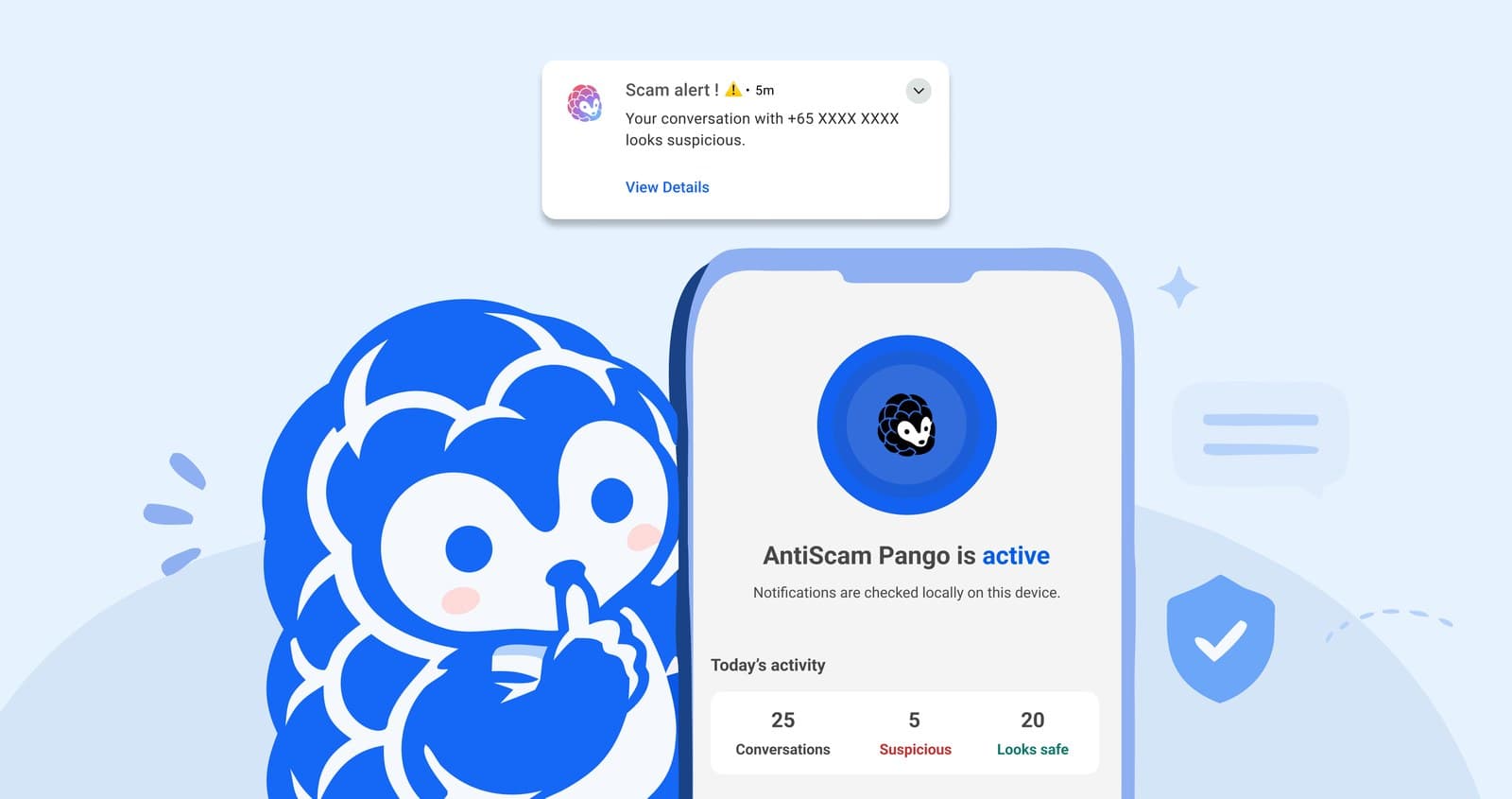
A government-built app can now warn you while a scam chat is still happening. GovTech and Google DeepMind launched AntiScam Pango on 4 November 2026. It is a beta Android app that reads new WhatsApp, Telegram and SMS messages as they arrive and shows a Scam Alert when a conversation looks suspicious. The analysis happens on your phone. If you have a newer Android phone and mostly get messages in English, it is worth a look. If you use an iPhone, or your parents get scam messages in Chinese, this does not help you yet.
> Quick view: launched 4 Nov 2026, in beta · Android 12 or newer with 6GB RAM or more, no iPhone version · about 300MB · checks WhatsApp, Telegram and SMS only · English only for now · warns but does not block · get it only from Google Play, published by Government Technology Agency
What the app does
Most messaging scams do not start with a bad link. They start with a friendly chat that builds trust over days, and the request for money comes later. Pango reads the conversation as it develops, so it can flag fake job offers, impersonation and romance scams before you reach that point. It also judges the wording of the messages, which means it can flag a sender nobody has reported yet.
When something looks off, you get a notification titled "Scam Alert!". Tap View details and Pango marks the conversation Suspicious, then explains why and what to do next. You can report it or mark it as safe. The decision stays with you, because the app does not block or delete messages.
Why now: the official Pango site counts 16,281 scam cases in the first half of 2026, more than 4,000 of which used WhatsApp or Telegram to reach victims.
Check these before you install
| Requirement | What GovTech says |
|---|---|
| Phone | Android 12 or newer, with 6GB of RAM or more. Google Play will not let you install it on an unsupported phone |
| iPhone | Not available. GovTech is exploring other ways to bring it to iOS, with no date |
| Download size | About 300MB, because the AI model sits on your phone. Use Wi-Fi |
| Apps covered | WhatsApp, Telegram and SMS (the Messages app). Messenger, Instagram, WeChat, LINE and Signal are not checked |
| Language | English only for now. Other languages may not be flagged |
| Price | The Google Play listing shows a plain Install button, with no price |
What it can see, and what leaves your phone
Pango needs two permissions to work: notification access, so it can read new messages, and permission to send you notifications, so it can warn you. Showing warnings over other apps, reading your contacts and sharing aggregated statistics are all optional.
GovTech's FAQ says the app cannot open your messaging apps, scroll through your chat history, or see anything from before you installed it. Three things can leave your phone, none linked to your name or number, according to GovTech:
- A scam report, only if you submit one. You can review it first, and any NRIC number in the message is hidden. A submitted report cannot be withdrawn.
- Aggregated statistics, such as how many messages were scanned. This is off by default.
- Standard app analytics, such as crashes, app version and device model.
Scanned messages stay on your phone for 7, 14 or 28 days, as you choose. Google Play's data-safety panel says the app may collect personal info and messages and that this data can't be deleted, so read it together with GovTech's explanation above before you decide.
What it will miss
GovTech is upfront about the gaps, and they matter more than the headline feature:
- Muted chats. Pango works from notifications, so a message that produces no notification may not be checked. The same goes for a message that arrives while you are reading that conversation.
- Non-English scams. A scam in Chinese, Malay or Tamil may pass with no alert, which is a real limit for many older users here.
- Phones that pause background apps. Some battery settings stop Pango from running until you open it again. The FAQ has steps to fix this.
- Safe senders. If someone on your safe list has their account taken over, you will not be warned about their messages. Add only people you trust, or skip this step.
Pango can also get it wrong in both directions. No alert does not mean a message is safe, so a sudden request for money, an OTP or urgent help still needs a separate check.
How to set it up
- Open Google Play and check the publisher. It should say Government Technology Agency. GovTech says to do this even if someone you know sent you the link. Since a fake version asking for notification access would be dangerous, do not install a copy from a link or APK file sent in a chat. The official link is on pango.gov.sg.
- Turn on auto-updates from the three-dot menu on the app's Google Play page.
- Allow notification access and alerts when the app asks.
- Turn on "Get more obvious scam warnings" on the home screen, so warnings appear over other apps as well as in notifications.
- Confirm the home screen says "AntiScam Pango is active".
Setting this up for a parent? GovTech has a checklist for helping someone else, including deciding on safe senders together.
If you get a Scam Alert
An alert does not mean you have been scammed. It means stop and check. Do not click links, call numbers in the message, or reply. Contact the person or organisation another way, using a number you already have or the official website. Unsure? Call the 24/7 ScamShield Helpline at 1799.
Reporting does not stop the sender, so block them inside WhatsApp, Telegram or your SMS app as well. If you have already transferred money or shared details, follow the steps on ScamShield and contact your bank straight away.
Pango or ScamShield?
| ScamShield | AntiScam Pango | |
|---|---|---|
| What it does | Blocks scam calls, filters suspicious SMS, checks numbers, links and messages you submit | Warns you about suspicious conversations as messages arrive |
| Needs you to submit a message? | Yes, for checks | No |
| Catches unreported numbers? | Depends on the check | Yes, it reads the wording |
| Phones | GovTech recommends it for most people | Android 12 or newer with 6GB RAM |
They are meant to be used together. GovTech says it is exploring building Pango into ScamShield, with no timeline.
Sources: AntiScam Pango official site and FAQ, Google Play listing, and The Straits Times on the 4 November launch. App features and requirements may change during the beta, so check the official site before relying on them.
Image: AntiScam Pango official site (GovTech).